User management
This area provides an overview of all users who have access to your Control Center Tenant, as well as the ability to add, remove, or edit users and user roles.
Adding a new user profile
To add a new user profile, click New User and fill in all required fields. The new user must set a personal password by verifying the email address via the Forgot your password? workflow on the login page.

User Management
Editing an existing user profile
Only the role or access rights can be changed. If you need to change the name or email address of a user, delete the profile and create a new one.
User roles
The permissions build on one another: each role also has the permissions listed above it.
| Role | Additional permissions |
|---|---|
| Data Analytics Viewer | View all Data Analytics dashboards, including the camera images shown there. Deprecated Data Analytics Data Analytics is deprecated. This role, formerly called Viewer, is relevant only for tenants that still use it. It does not grant access to the device list or device groups, and cameras cannot be configured. |
| Viewer | View accessible devices and device groups, including device, model, and event-trigger configurations. |
| User | Change device, model, and event-trigger configurations and Data Analytics; create, rename, and delete device groups within their access scope; move devices between accessible groups; create and manage own monitoring alerts; schedule device updates. |
| Admin | Access all devices and groups; manage licenses, users, and device-group access. |
Device Group Access Control
Device-group access determines which groups and devices Users and Viewers can access. Their role determines what they can do with them. Admins manage access assignments and can access all devices and device groups of the tenant.
User-centric access management
Device-group access for User and Viewer roles can be edited in User Management by clicking Edit User or when creating a new user. The options are:
- All Groups: The user has global access to all devices and device groups of the tenant. This includes ungrouped devices, all current device groups, and all future device groups.
- Selected Groups: Select individual groups or Ungrouped Devices in the tree. Access to a selected group includes its devices and all its subgroups.
New users and viewers have no device-group access by default.
Users can create, rename, and delete device groups within their access scope and move devices between groups they can access. Access to a device follows its group: if the device is moved to a group that a user cannot access, that user loses access to it.
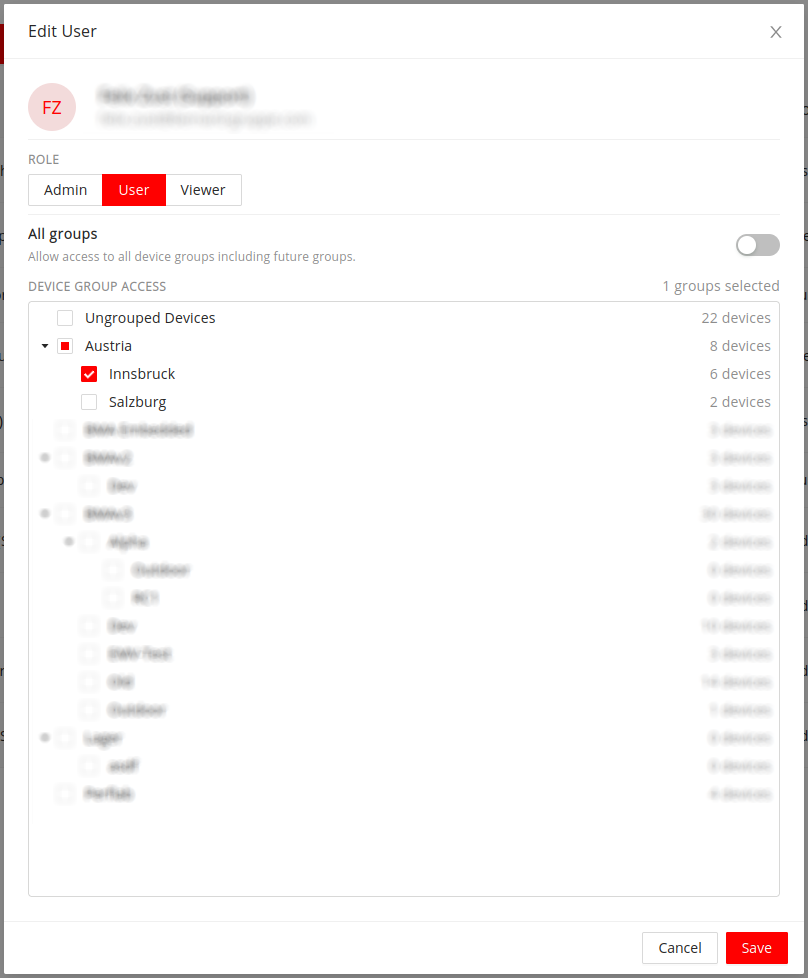
User-centric access management
Group-centric access management
Access can also be changed in the Devices view by selecting a device group in the tree and clicking on the user icon.
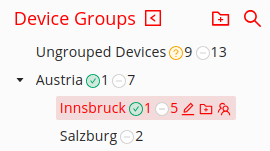
Device group tree with user icon for access control
A dialog opens showing the users who currently have access to the group, along with the number of admins with access. For each user, it displays:
- Role: The user's role, such as User or Viewer.
- Access Type: How access is obtained (Direct, Inherited, or Global).
For users with Direct access, permissions can be revoked by clicking the x. To change Inherited access, edit the assignment on the parent group shown in the dialog. To change Global access, edit the user's All Groups setting in User Management.
To grant additional users access to the device group, search for them in the dropdown and click Assign User. The user will receive direct access to the selected group and inherit access to all its subgroups.
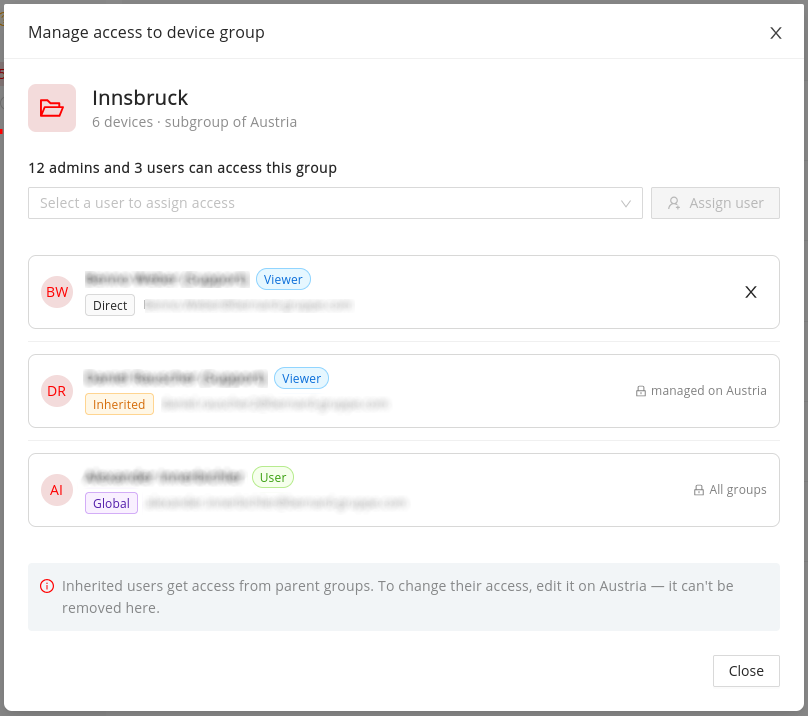
Group-centric access management