Mounting
Mounting the BMA
- Attach the BMA to the pole using the supplied clamps.
- Drill a hole underneath the camera, then screw the cable gland with seal into the hole. Feed the cable through the pole down to the ground. At the other end of the cable, ensure the correct plug (2- or 3-pin) for the BMA is present.
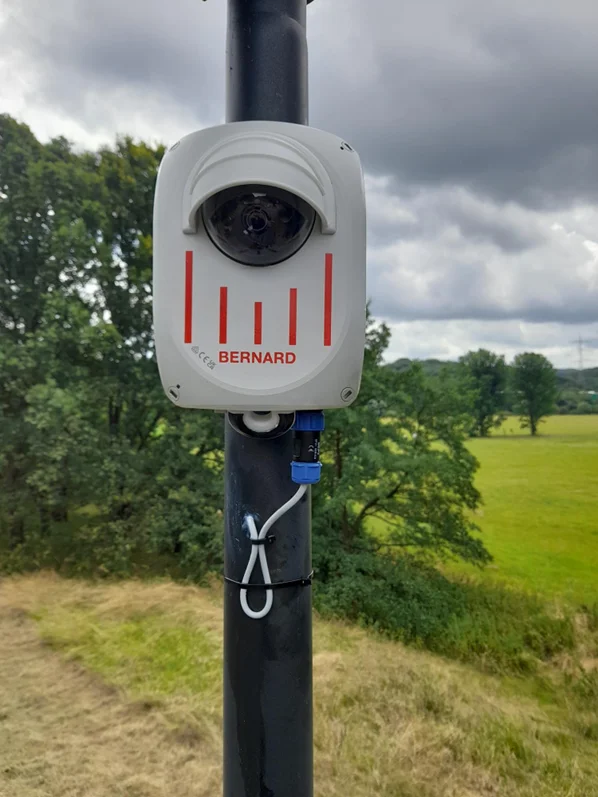
Mounting the BMA
Configure LTE with your SIM card
When you install your own SIM card, you must adapt the LTE APN settings so the modem can register in the mobile network.
Prepare your SIM card
- Disable the SIM PIN before inserting the SIM card into the LTE stick.
- Enable roaming if the system will be used outside your domestic network.
Remove the LTE stick and SIM
- Make sure the BMA is powered off before you open the housing.
- Open the device cover, then unplug the LTE stick from the USB port.
- Slide the LTE stick cover downward to remove it.
- Eject the existing SIM card (if any) and insert your new micro- or nano-SIM card into the dedicated slot.

Slide the cover to open the LTE stick

Remove the old SIM card and insert your new SIM card
Update the APN settings
- Connect the LTE module to a PC and open
http://192.168.8.1in a browser. - Sign in with the default password
SIM12345and change it right away for security. - Turn off LTE, then open Settings → LTE settings → APN.
- Enter the APN details supplied by your network operator and set the profile as default.
- Turn LTE back on to apply the changes.

Verify the connection
- Ensure the LTE module is connected and shows a solid green or blue LED to indicate signal.
- Disconnect the PC from any other network by disabling Wi-Fi and unplugging any network cable.
- Browse to a public website to confirm the SIM and APN configuration allow data transfer.
Troubleshooting
- LED blinking green or blue: The modem is registered but no data session is active. Reopen the APN settings and verify the profile details are correct for your provider.